HDR Photos: What's Inside a JPEG with a Gain Map
On an HDR display, the sun or a highlight in a photograph can sometimes look brighter than the white background of a page. Let's break down, without magic, where the screen gets the instruction to make individual pixels brighter. The example is the file IMG_20260816_183557.jpg from a Xiaomi 17.
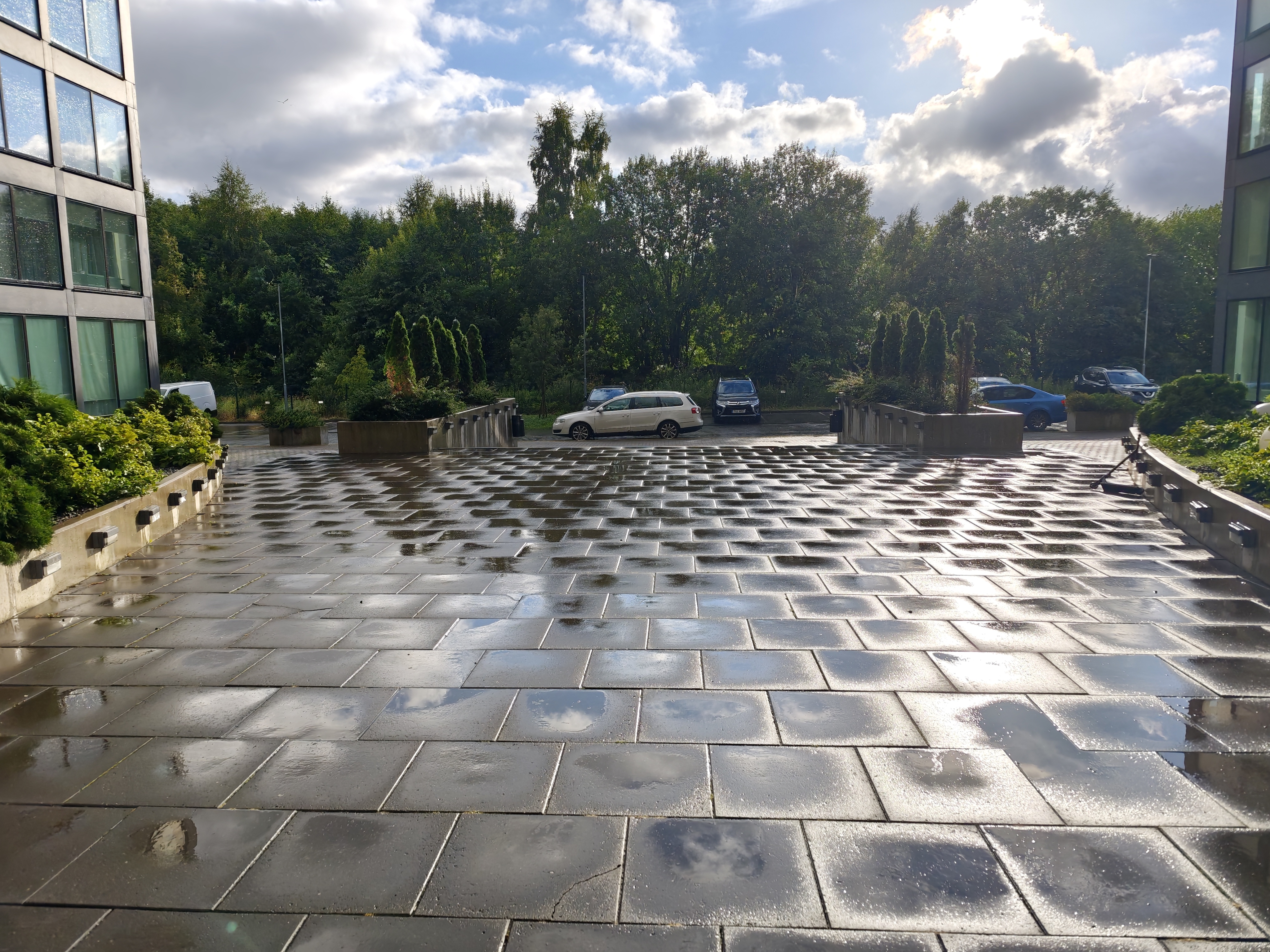
The HDR effect in this photograph is visible only on an HDR screen in a compatible browser.
Pixel, channel, and bits
Here, channel means a component of a digital representation of color. In the RGB model, three numbers define a pixel's color: red R, green G, and blue B.
An 8-bit channel has 2⁸ = 256 possible codes, from 0 to 255. For example, after decoding, a program might represent one pixel like this:
one pixel in a decoded RGB buffer

R: 11010110  = 214
G: 10011100  = 156       8 + 8 + 8 = 24 bits in total
B: 00110101  =  53       excluding transparency
After decoding, pixels may be stored in memory as RGB, BGR, or RGBA, but that does not describe the structure of a JPEG file. Even BMP adds headers and its own storage rules.
RGB is not the only encoding scheme:
| Scheme | Components | Where it appears |
|---|---|---|
| Grayscale | one gray value | masks, maps, black-and-white images |
| RGB / RGBA | red, green, blue, and optional transparency | decoded images, graphics, interfaces |
| YCbCr | luminance Y and two color-difference components Cb/Cr | JPEG and video, often with lower resolution for color components |
A color also requires a color space and a transfer function for unambiguous interpretation. Black in an ordinary RGB example is encoded as (0, 0, 0), and white as (255, 255, 255), but these are color codes, not brightness values in nits.
More bits provide more intermediate codes per channel:
| Bit depth | Channel values | RGB pixel variations |
|---|---|---|
| 8 bits | 256 | 16.7 million |
| 10 bits | 1024 | 1.07 billion |
| 12 bits | 4096 | 68.7 billion |
10 or 12 bits reduce banding in gradients and provide more room for processing. But this is precisely why an 8-bit JPEG can still produce HDR: bit depth describes the number of codes inside the base image, while brightness above SDR white is added by a second image with a gain map and metadata that tells the decoder how to apply it.
How a JPEG is stored in the file and in memory
After decoding, a program really can hold an image as an array of RGB pixels. For a 4096 x 3072 frame with 8 bits per channel across three channels, such an uncompressed array would occupy:
4096 × 3072 × 3 bytes = 37,748,736 bytes ≈ 36 MiB
JPEG is organized differently on disk. In typical encoding, RGB is first converted into one luminance component Y and two color-difference components Cb/Cr. The color channels are often reduced in resolution, the image is divided into blocks, values are converted into frequency coefficients using a discrete cosine transform, rounded, and encoded without unnecessary repetition.
flowchart TB
    subgraph memory[In the editor's memory: about 36 MiB]
        RGB[RGB pixels<br/>4096 × 3072 × 3 bytes]
    end

    subgraph encoder[JPEG encoding]
        direction LR
        YCC[Conversion<br/>RGB → YCbCr]
        SUB[Subsampling<br/>color channels]
        DCT[Blocks and DCT]
        Q[Rounding<br/>coefficients]
    end

    FILE[(Compressed JPEG<br/>about 4.77 MB)]
    DEC[Decoding]
    SCREEN[Pixels<br/>on screen]

    RGB --> YCC --> SUB --> DCT --> Q --> FILE
    FILE --> DEC --> SCREEN
The main quality loss happens when the coefficients are rounded. That is why JPEG is compact, but resaving it can add artifacts. In the file under investigation, the main frame takes about 4.77 MB instead of roughly 36 MiB for the decoded RGB array.
The number 8 in the JPEG header means the precision of the samples in the base image. It does not prohibit attaching a second image and metadata that together describe HDR.
What this file consists of
A JPEG is a sequence of sections, or segments. The range of APP0...APP15 markers is defined in Annex B of ITU-T Recommendation T.81, the joint text with ISO/IEC 10918-1, while the rules for using APPn markers are described in the current ITU-T Recommendation T.86. APP1, APP2, and other markers allow auxiliary data to be placed next to the compressed pixels. Parsing the Xiaomi file produced this map of segments in their order of appearance. For APPn, the table gives the value of the two-byte JPEG segment length field: it includes the length field itself but not the two-byte FFEn marker.
| Order | JPEG | Offset | Segment | Length / parameters |
|---|---|---|---|---|
| 1 | primary | 2 | APP1 XMP |
948 B |
| 2 | primary | 952 | APP3 ALGO_COMMON |
22,672 B |
| 3 | primary | 23,626 | APP2 ICC_PROFILE |
648 B |
| 4 | primary | 24,276 | APP4 XIAOMI_CUSTOMIZE |
546 B |
| 5 | primary | 24,824 | APP3 OISINFO |
7,574 B |
| 6 | primary | 32,400 | APP2 urn:iso:std:iso:ts:21496:-1 |
34 B |
| 7 | primary | 32,436 | APP2 MPF |
88 B |
| 8 | primary | 32,660 | SOF0 |
4096 × 3072, 3 components, 8 bits |
| 9 | primary | 4,773,110 | EOI |
end of the base JPEG |
| 10 | gain map | 4,773,114 | APP1 XMP |
549 B |
| 11 | gain map | 4,773,665 | APP2 ISO 21496-1 |
91 B |
| 12 | gain map | 4,773,758 | APP0 JFIF |
16 B |
| 13 | gain map | 4,773,845 | SOF0 |
2048 × 1536, 1 component, 8 bits |
An old decoder reads the first JPEG up to the end-of-image marker and displays a normal SDR photograph. A compatible decoder finds the second image, reads the gain map parameters, and builds an HDR rendition. Therefore, the .jpg extension does not contradict HDR.
EXIF: what was used to take the photo
EXIF is described in the official specification CIPA DC-008-Translation-2026, Exif Version 3.1. This is indeed the current edition as of the article date: CIPA published it on January 30, 2026, as a revision of CIPA DC-008-2024. EXIF is a standard table of photographic metadata: camera model, shutter speed, aperture, ISO sensitivity, orientation, time, and sometimes GPS. These fields describe the origin of the photograph, but do not contain the visible pixels themselves.
On Xiaomi, some information is stored in the camera's proprietary block: model Xiaomi 17 and Hdr: auto. Here, Hdr: auto says that the camera's HDR mode was automatic. That is not enough to prove the presence of reproducible HDR: the manufacturer might have combined several exposures into an ordinary SDR JPEG. The proof is in the gain map and its metadata.
ISO in EXIF and ISO 21496-1 are different meanings of the word ISO. In EXIF, ISO 100, 400, or 1600 means the light-sensitivity setting used when taking the photo. ISO 21496-1 is the number of the international technical standard for storing gain maps.
XMP: extensible instructions
XMP is textual metadata in a format resembling XML. EXIF has a predefined set of photographic fields, while XMP allows namespaces from manufacturers and software. This lets Adobe add hdrgm:* fields without changing the JPEG decoder itself.
The second image in this file contains:
hdrgm:Version="1.0"
hdrgm:GainMapMin="0"
hdrgm:GainMapMax="2.32193"
hdrgm:Gamma="1"
hdrgm:OffsetSDR="0"
hdrgm:OffsetHDR="0"
hdrgm:HDRCapacityMin="0"
hdrgm:HDRCapacityMax="2.32193"
hdrgm:BaseRenditionIsHDR="False"
The metadata itself takes almost no space. The main additional volume comes from the JPEG containing the gain map.
MPF: where to find the second image
In Ultra HDR, the main mechanism for discovering the gain map is not MPF but the Google Photos Container XMP directory. It is stored in the base frame's APP1 XMP. Container:Directory lists the primary item with Item:Semantic="Primary" and the additional item with Item:Semantic="GainMap"; Item:Length gives the length of the added image. In the file under investigation, the directory looks like this:
<Container:Directory>
  <rdf:Seq>
    <rdf:li rdf:parseType="Resource">
      <Container:Item
        Item:Semantic="Primary"
        Item:Mime="image/jpeg"/>
    </rdf:li>
    <rdf:li rdf:parseType="Resource">
      <Container:Item
        Item:Semantic="GainMap"
        Item:Mime="image/jpeg"
        Item:Length="931559"/>
    </rdf:li>
  </rdf:Seq>
</Container:Directory>
MPF, or Multi-Picture Format, is an additional mechanism: its APP2 index stores the dimensions, offsets, and types of multiple JPEG images. It resembles a second table of contents for the same container. The Ultra HDR specification requires both MPF and GContainer XMP to be added after writing the secondary image. Neither one alone describes the brightness mathematics.
A urn:iso:std:iso:ts:21496:-1 label and binary ISO 21496-1 data are also present nearby. The standard defines a gain map as a way to transform between two dynamic-range renditions. This file contains Adobe XMP fields and the ISO variant of the metadata; GContainer and MPF indicate where the images are located.
Rendition: one photograph's representation
Rendition here means not a new subject and not a copy at another size, but one visual representation of the same scene. For example:
- an SDR rendition is intended for an ordinary display range;
- an HDR rendition preserves brighter highlights;
- a gain map contains the difference needed to move between them.
BaseRenditionIsHDR="False" means that the primary JPEG is the SDR rendition. If a program ignores everything after it, the photograph still looks correct.
What the gain map encodes
A gain map resembles a black-and-white mask. Each of its points reports not a final brightness but a multiplier for the corresponding area of the base image:
Base frame: the color SDR rendition shown by programs without gain-map support.
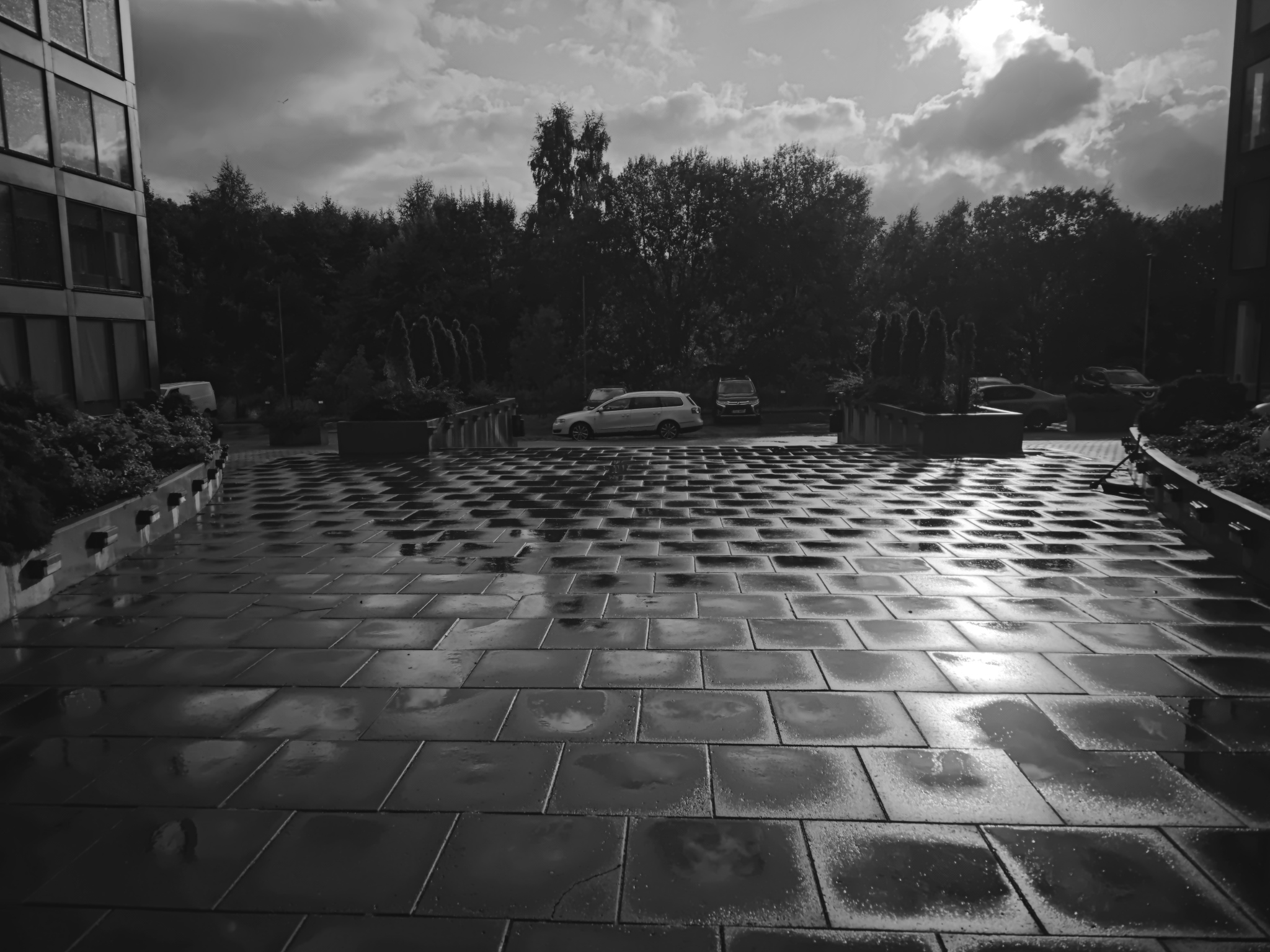
Gain map: bright areas require more amplification, up to ×5; dark areas remain unamplified, or ×1.
flowchart LR
    SDR[SDR base<br/>color and fine detail]
    MAP[Gain map<br/>dark: about ×1<br/>bright: up to ×5]
    META[Metadata<br/>min · max · gamma<br/>capacity · offsets]
    HEAD[Display headroom<br/>HDR white / SDR white]
    DEC[HDR decoder<br/>scale the map<br/>calculate weight<br/>amplify linear RGB]
    OUT[Representation for the screen<br/>SDR · intermediate · full HDR]

    SDR --> DEC
    MAP --> DEC
    META --> DEC
    HEAD --> DEC
    DEC --> OUT
The map can be smaller than the primary frame because amplification changes more smoothly than the photograph's fine details. In our file, each dimension of the map is exactly half the corresponding dimension of the base. When displayed, the decoder scales it and smoothly interpolates it. A single gray channel is enough when R, G, and B are amplified equally. The format also permits separate values for the color channels.
The simplified mathematics for an SDR base looks like this:
map       = map pixel value from 0 to 1
logGain   = lerp(GainMapMin, GainMapMax, map ^ (1 / Gamma))
boost     = log2(HDR white of display / SDR white of display)
weight    = clamp((boost - HDRCapacityMin) /
                  (HDRCapacityMax - HDRCapacityMin), 0, 1)
HDR       = (SDR + OffsetSDR) × 2 ^ (logGain × weight) - OffsetHDR
lerp(a, b, t) selects a position between the minimum and maximum, while clamp limits the result to the range 0...1. If Gamma is 1, as in this file, the exponent does not change the map. The actual operation is performed on linear color values, not directly on the 0...255 numbers from the JPEG.
For example, take a linear SDR component value of 0.4, a map value of 0.5, and a display whose HDR white is four times brighter than its SDR white. With this file's parameters, the calculation goes all the way through as follows:
logGain = lerp(0, 2.32193, 0.5) = 1.160965
boost   = log2(4) = 2
weight  = 2 / 2.32193 ≈ 0.86135
HDR     = 0.4 × 2 ^ (1.160965 × 0.86135)
        = 0.4 × 2¹ = 0.8
In other words, this area receives a twofold boost: not the maximum ×5 from the metadata, because the map value is in the middle, and the display's headroom is limited by a fourfold white ratio.
There is also a cost in bytes. The compatible JPEG base ends at offset 4,773,112, while the entire file occupies 5,704,671 bytes. This means that the second JPEG with its gain map and auxiliary data adds 931,559 bytes: 931,559 / 4,773,112 ≈ 19.5% of the size of the ordinary base.
The fields mean the following:
| Field | Meaning during decoding | Value in the file |
|---|---|---|
GainMapMin |
minimum logarithm of the gain | 0, or 2⁰ = ×1 |
GainMapMax |
maximum logarithm of the gain | 2.32193, or 2²·³²¹⁹³ ≈ ×5 |
Gamma |
map encoding exponent, which the decoder applies as 1 / Gamma |
1, with no additional curve |
OffsetSDR/HDR |
small offsets before and after multiplication, useful near black | 0 and 0 |
HDRCapacityMin/Max |
the display headroom at which to start and finish applying the map | from 0 to 2.32193 stops |
BaseRenditionIsHDR |
whether the primary JPEG is the HDR side of the conversion | False, base is SDR |
The numbers are given in exposure stops, that is, logarithms to base 2. Therefore, GainMapMax="2.32193" encodes an upper limit of approximately ×5, not a 2.32-fold amplification. This does not promise that every pixel will become five times brighter: the value depends on the map itself, and weight limits the effect according to the screen's capabilities.
Why Gamma is not the same as display gamma
The word gamma is used in two places:
hdrgm:Gammacurves the values inside the gain map to distribute its limited codes more precisely;- an image transfer function, such as the approximate sRGB gamma, connects a color code to linear light.
These are different stages. In this file, ImageMagick reports the base image gamma as approximately 0.4545, while the gain map field is 1. The first concerns color interpretation, and the second concerns gain-map decoding. A gain map is also not ordinary gamma correction: gamma applies one curve to all pixels with the same input value, while a map can give two areas with the same original brightness different amplification.
How an image becomes brighter than white
The ordinary white of an interface serves as the SDR reference point. An HDR display has headroom, or brightness available above that point. The decoder learns the available headroom, calculates weight, reconstructs HDR pixels using the map, and passes them to the window system. Thus, a highlight can physically emit more light even though the base JPEG is still limited to the value 255.
Three conditions must hold at the same time:
- the file contains a base image, a gain map, and correct metadata;
- the application knows how to decode them;
- the display and system mode provide HDR headroom.
On an SDR monitor or in an old program, only the base rendition is shown. With an intermediate amount of headroom, the map is applied partially rather than simply being switched on or off.
Why not simply use 10-bit AVIF, HEIC, or JPEG XL
These formats can also store HDR: the AVIF specification supports HDR and AV1 bit depths, Apple describes 10-bit HEIF for ISO HDR, and the JPEG Committee lists HDR and high bit depths for JPEG XL. But a 10-bit HDR frame by itself does not give an old JPEG decoder a ready-made SDR version, nor does it encode two artistically matched versions for different amounts of display headroom. Ultra HDR solves precisely this task: an ordinary 8-bit JPEG remains a safe SDR base, while the gain map allows a smooth transition to intermediate or full HDR.
This is not a contrast between JPEG and HEIF. Apple's Adaptive HDR uses the same ISO 21496-1 standardized SDR + gain map model and defines storage in both HEIF and JPEG. Starting with iOS 18, the iPhone 15 and iPhone 15 Pro moved to Adaptive HDR; in HEIC, the gain map is stored as an additional HEIF image rather than as a second JPEG. Therefore, the choice of container and the choice to use a gain map are separate decisions.
Where gain maps actually work
Support has two levels: the program must preserve and read the gain map, and the system with its display must provide HDR headroom. As of the date of this article, the following scenarios are confirmed:
- Browsers. In Chromium, the
GainmapHdrImagesfeature is enabled by default, so Ultra HDR JPEG is rendered in Chrome on a system with available HDR headroom. In Safari 26.0, WebKit added HDR images on web pages, and in May 2026 separately added extraction of ISO Gain Map and Apple HDR Gain Map through the system decoder. On an SDR display and in a decoder without gain-map support, the base JPEG is shown. - Galleries. Android has been able to decode and display Ultra HDR since Android 14. Google Photos explicitly states that it supports Ultra HDR: an individual photograph opens in HDR on a compatible screen, while thumbnails in the general grid remain SDR. On Apple platforms, system APIs read and display gain-map HDR; starting with iOS 18, the iPhone 15 and 15 Pro create the Adaptive HDR described above.
- Social networks. For Instagram, there is published confirmation from the Android team: the app allows users to edit up to ten Ultra HDR photos and publish them while preserving the full dynamic range. For other social networks without documentation, preservation of the gain map cannot be considered guaranteed.
What strips HDR is also determined not by the file extension but by the processing pipeline. Google Photos warns that an unsupported edit saves the result as SDR, while highlight video always uses SDR versions. An ordinary decoder that reads the base JPEG and then re-encodes the pixels does not automatically carry over the GContainer XMP, MPF, second JPEG, and ISO metadata. In contrast, standard Android operations such as cropping and rotation can preserve Ultra HDR when performed through gain-map-aware APIs, so it is not correct to claim that every kind of processing necessarily destroys the map.
Tools
Only capabilities confirmed by the projects' own documentation are included in the table.
| Tool | What it does | Does it output a JPEG with a gain map? |
|---|---|---|
| Extra Bright Images | Builds HDR locally in the browser from an ordinary image; the Make brights brighter, Gain, and Highlight threshold settings act automatically across the whole frame |
Yes - the Download Ultra HDR button outputs an Ultra HDR JPEG; a Native HDR PNG is also available separately |
| Lightroom | Imports, edits, and exports HDR; when saving a JPEG with HDR edits, it preserves the SDR image and HDR details in a gain map | Yes - a JPEG with HDR edits is saved with a gain map |
| Adobe Camera Raw | Opens and edits HDR, supports local masks, and saves HDR to JPEG; separate Gain Map documentation describes the base + gain map + metadata representation |
Yes - JPEG is listed among the supported HDR output formats |
libultrahdr CLI |
Reference Ultra HDR codec: encodes from HDR/SDR renditions, assembles ready-made SDR JPEGs and gain maps, decodes them, and outputs metadata in probe mode | Yes - ultrahdr_app creates out.jpeg with the base, gain map, and metadata by default |
exiftool |
Reads XMP and MPF, displays parameters of embedded images, and can extract the additional JPEG; the documentation marks MPF tags as unavailable for writing | No - this is a metadata analysis tool, not a JPEG gain-map encoder |
If the source has already lost detail in an overexposed area, no tool can restore it through amplification alone: only the brightness of the data that is already present will change.
How not to lose HDR when publishing
An ordinary image processor may read only the first JPEG, resize it, and save a new file. The MPF, XMP, ISO metadata, and the gain map itself will then disappear. The presence of a .jpg extension, and even copying EXIF, does not guarantee that HDR will be preserved.
You can check the metadata and extract the map with reproducible commands from the project root:
# Show the Adobe HDR gain map, MPF, and Google Photos Container.
exiftool -G1 -s -XMP-hdrgm:All -MPF:All -XMP-GContainer:All \
  content/files/IMG_20260816_183557.jpg

# Extract the second image from MPF without decoding or recompressing it as JPEG.
exiftool -b -MPImage2 content/files/IMG_20260816_183557.jpg \
  > content/files/IMG_20260816_183557-gainmap.jpg
If the installed ExifTool does not return MPImage2, a short Python fallback finds the second JPEG start marker, FF D8, and saves the data through the end of the file:
from pathlib import Path

src = Path("content/files/IMG_20260816_183557.jpg")
dst = Path("content/files/IMG_20260816_183557-gainmap.jpg")
data = src.read_bytes()
second_soi = data.find(b"\xff\xd8", 2)

if second_soi < 0 or not data.endswith(b"\xff\xd9"):
    raise SystemExit("second JPEG not found")

dst.write_bytes(data[second_soi:])
print(f"wrote {dst}: {len(data) - second_soi} bytes from offset {second_soi}")
This fallback is suitable for this file, where the second JPEG occupies the entire tail. For an arbitrary container, MPF or GContainer is more reliable, because other data may follow the additional image.
A practical check after processing:
1. Is there a second JPEG inside the file?
2. Did the MPF and the ISO 21496-1 label or XMP hdrgm remain?
3. Does the SDR rendition look the same in an old viewer?
4. Do additional highlights appear in an HDR viewer?
That is why the photograph in this article is included as the original static JPEG rather than as an automatically generated WebP thumbnail.
Short conclusion
The file under investigation does not contain an "8-bit HDR pixel." It contains a compatible 8-bit SDR JPEG, a second single-channel JPEG with a spatial gain map, and instructions for combining them. EXIF tells the story of the capture, XMP and ISO 21496-1 describe the conversion, GContainer XMP announces the primary frame and gain map, MPF supplements it with an image index, and the HDR decoder assembles a rendition suited to the capabilities of a particular display.
Sources for further reading: