
Types of network errors: what each one means and what to do about it
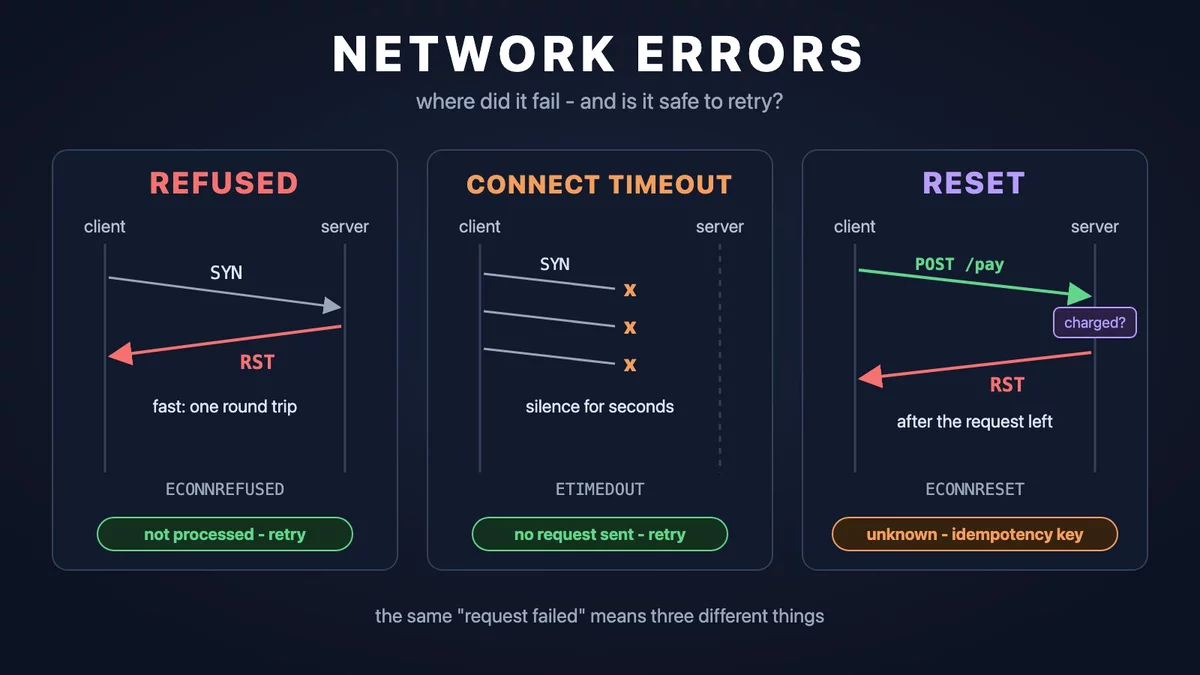
In logs every network error looks the same: "the request failed". But connection refused means "the server definitely received nothing", while connection reset after sending means "I have no idea what happened". That difference decides whether a request can be retried automatically, or whether the retry charges the card a second time. In this article I go through where each error is born, how to recognise it by its code and by its timing, when to retry, and how not to take down someone else's service with your own retries.
The path of one request: layers
When code calls GET https://api.example.com/track/42, several independent steps happen under the hood, and each can break in its own way:
- DNS - translating the name
api.example.cominto an IP address. It is a separate request to a DNS server, before any connection exists. - IP and routing - the operating system decides through which network interface and which router to send packets to that address.
- TCP - setting up a connection to a specific port (443 for HTTPS). TCP guarantees that bytes arrive intact and in order.
- TLS - encryption on top of TCP: both sides agree on keys and the client verifies the server certificate.
- HTTP - the request itself (method, path, headers, body) and a response with a status.
- Application - the business logic on the server, which can answer with an error even when the network is perfect.
A program talks to the network through a socket - an operating system object similar to an open file. Code calls system functions such as getaddrinfo() (DNS), connect() (set up a connection), write() and read(). When a call fails, the kernel returns a numeric error code - errno - that has a name: ECONNREFUSED, ETIMEDOUT and so on. Almost every HTTP library in every language ends up showing you exactly these names, just wrapped in its own exception classes. The DNS function getaddrinfo() is the exception: it has its own codes with the EAI_ prefix.
TCP in five minutes: SYN, ACK, RST and FIN
A TCP connection starts with a three-way handshake:
- The client sends a
SYNpacket ("I want to connect"). - The server answers
SYN-ACK("agreed, acknowledged"). - The client answers
ACK. The connection is established andconnect()returns success.
Two more flags matter. FIN is a polite close: "I will not send anything else, but I will read what you send". RST (reset) is an abort: "I have no such connection" or "I am dropping it right now". The TCP standard (RFC 9293) requires it explicitly: if a segment arrives for a port where nobody listens, the host answers with RST.
Now the useful part. A failed connection attempt can look on the wire in three different ways:
- RST in response to SYN - the host is alive, but nobody listens on that port (the application crashed, is restarting, listens on another port). Or a firewall is configured to REJECT and answers for the host. The error arrives quickly, in about one RTT.
- Silence - the packet got lost somewhere. A firewall is configured to DROP silently, the host is down, the NAT connection table is full. The kernel resends SYN with growing pauses, and if you did not set your own connect timeout, Linux gives up only after about two minutes (the
tcp_syn_retriessetting, 6 retries by default). - ICMP unreachable - a control message from a router on the way: "cannot deliver there". The kernel turns it into
EHOSTUNREACHorENETUNREACH. If a firewall answers with ICMP "port unreachable", the client seesECONNREFUSEDinstead.
An errno dictionary
These are the codes you meet most often in practice. "Stage" is when exactly the error happens.
| Code | Stage | What happened on the wire | What it means |
|---|---|---|---|
EAI_NONAME | DNS | The DNS server answered "no such name" (NXDOMAIN) | A typo in the host, a deleted domain, an internal name not visible from this network. In Node.js it is ENOTFOUND |
EAI_AGAIN | DNS | The DNS server did not answer or returned a temporary failure | A resolver problem, usually temporary |
ECONNREFUSED | connect | RST came back for our SYN (or ICMP port unreachable) | The host is alive, nobody listens on the port |
ETIMEDOUT | connect or later | No answer: SYN or data are never acknowledged | Packets are lost or dropped. On an established connection the kernel reports it only after 13-30 minutes of failed retransmissions (tcp_retries2), so you usually see your library's timeout first |
EHOSTUNREACH | connect | ICMP host unreachable, or nobody answered ARP on the local network | The host is not on the network or the route is closed |
ENETUNREACH | connect | Usually nothing was sent: the routing table has no path | No network: interface down, no default route, an IPv6 address without IPv6 connectivity |
ECONNRESET | after connect | RST arrived on an established connection | The server, load balancer or NAT aborted the connection. The request may already have been processing |
EPIPE | write | Writing to a connection that is already closed or reset | The other side left before we finished writing. Runtimes ignore the SIGPIPE signal and turn it into this error |
EADDRNOTAVAIL | connect | Nothing: the kernel could not pick a local port | Ephemeral ports ran out, details below |
EMFILE / ENFILE | socket, accept | Nothing: a new descriptor could not be opened | The open file limit of the process (ulimit -n) or of the whole system |
EPERM / EACCES | connect | Nothing: a local firewall or security policy blocked the packet | A rule on your machine, not on the server |
To make it stick, here is an interactive cheat sheet. Click an error to see at which stage it happens and whether it can be retried.
The timing of an error tells you who answered
The same error code can come from different parties. The duration of the attempt helps a lot here, so I always log it together with the error class.
| Time to error | What it means | Who most likely answered |
|---|---|---|
| Under 1 ms | The packet never left the machine | Your own kernel: nothing listens on localhost, no route, no free ports or descriptors, a local firewall |
| About 1 RTT | The packet arrived, someone answered with RST or ICMP | The remote host, its load balancer or a firewall with a REJECT rule. Compare with the time of successful connects to the same host |
| About 3 s on a LAN | The kernel got no ARP reply | Nobody: no host with that IP on the subnet (EHOSTUNREACH) |
| Exactly your connect timeout | Complete silence | Nobody: DROP on a firewall, a full conntrack or NAT table, a host that is down, a full SYN queue on the server |
| About 2 minutes | The kernel ran out of SYN retries | Also nobody, and a sign that you did not set a connect timeout |
ECONNREFUSED behind a load balancer is rare, and when it appears, either the load balancer itself is not listening or you are talking to the application directly.Request stages: could the server have processed it?
For the retry decision what matters is not the error code itself, but the moment it happened. There is one boundary I call the point of no return: the moment the first byte of the HTTP request leaves for the network. Before it, the server physically could not do anything. After it, it could.
| Stage | Typical errors | Could the server have processed it? | Retry |
|---|---|---|---|
| 1. DNS | EAI_NONAME, EAI_AGAIN | No | EAI_AGAIN - yes. EAI_NONAME is usually a configuration error, a retry will not help |
| 2. connect | ECONNREFUSED, connect timeout, EHOSTUNREACH | No | Yes, with a pause |
| 3. TLS | handshake timeout, reset during the handshake | No | Yes. But retrying a certificate verification error is pointless: it is deterministic |
| 4. Sending the request | EPIPE, ECONNRESET, write timeout | Possibly | Idempotent only |
| 5. Waiting for the response | read timeout, ECONNRESET, 502, 504 | Probably yes | Idempotent only |
| 6. Reading the body | reset or timeout mid-body | Yes, the response has started | Idempotent only |
A separate note on HTTP statuses from proxies. 502 Bad Gateway and 504 Gateway Timeout are network errors that the proxy retold to you in HTTP words: "I could not get an answer from the application". If the application received the request and then crashed or got stuck, the operation may have run. That is why I put 502 and 504 into stage 5. 503 Service Unavailable and 429 Too Many Requests, on the other hand, usually mean "I refused to do the work", especially when the response has a Retry-After header.
Retries: when they are allowed and how to do them right
Idempotency
An operation is idempotent if doing it twice is the same as doing it once. "Set the order status to shipped" is idempotent. "Charge 10 euros" is not: twice is 20 euros.
The HTTP standard (RFC 9110) defines GET, HEAD, OPTIONS, TRACE, PUT and DELETE as idempotent methods, and says explicitly that a client should not automatically retry a non-idempotent request unless it knows that this is safe. POST and PATCH are non-idempotent by default. Note that this is a promise made by the server, not a property of the method: a badly designed API can charge money on a GET, and HTTP will not protect you.
To retry a POST safely, people use an idempotency key. The client generates a unique key per logical operation and sends it in every attempt. The server stores the key with the result and, on a retry with the same key, returns the stored response instead of charging again. Payment providers have used this approach for a long time, and the IETF has a draft standard for the Idempotency-Key header.
# the same key in every attempt
POST /payments HTTP/1.1
Host: api.example.com
Idempotency-Key: 8e03978e-40d5-43e8-bc93-6894a57f9324
Content-Type: application/json

{"order_id": 1001, "amount": 1000, "currency": "EUR"}
The key must be generated before the first attempt and stored together with the operation. A key regenerated on every retry is useless.
This leads to two delivery modes that are worth choosing explicitly:
- At-most-once - no retry after the point of no return. An operation is sometimes lost, but never executed twice.
- At-least-once - retry until a confirmation arrives. An operation can run twice, so the receiver must be able to drop duplicates. An idempotency key turns at-least-once into "effectively exactly once".
Retry or not: a decision chart
Pausing between attempts: exponential backoff and jitter
Retrying instantly is a bad idea. If a service fell over from overload, instant retries from all clients will finish it off. The standard recipe is exponential backoff: each next pause is twice as long (0.5 s, 1 s, 2 s, 4 s...) with an upper cap.
Backoff alone is not enough. If a thousand clients got an error at the same moment, they also retry at the same moment, exactly after 0.5 s, then after 1 s, in waves. So you add jitter - random spread. The simplest good variant is "full jitter": the pause is a random number between zero and the exponential limit.
# attempt = 0, 1, 2, ...
sleep = random(0, min(cap, base * 2 ** attempt))

# base = 0.5 s, cap = 10 s:
# attempt 0: 0..0.5 s
# attempt 1: 0..1 s
# attempt 2: 0..2 s
# attempt 5: 0..10 s (hit the cap)
Retry budgets and retry storms
Retries multiply across layers. Say the browser makes 3 attempts, your API server makes 3 attempts to the order service for each, and that one makes 3 attempts to the database for each. One button click becomes 3 × 3 × 3 = 27 queries to the database, exactly when the database is already struggling. This is a retry storm.
Rules that help:
- Retry in one layer. Usually where there is the most context: whether we know about idempotency, how much time the user has left.
- Limit the number of attempts. The Google SRE book suggests at most three attempts per request.
- Limit the share of retries. The same book suggests a per-client budget: retries should stay below about 10% of all requests. When a service is fully down, this automatically turns retries into a trickle instead of a flood.
- A total deadline. Limit not only the number of attempts but also the total time. There is no point in a third attempt if the user has already left the page.
Circuit breaker
A circuit breaker (named after the one in an electrical panel) is a wrapper around calls to an external service that counts errors. When the error rate over a recent window crosses a threshold, the breaker "opens": the following calls fail immediately without touching the network. After a while it lets a trial request through, and if that succeeds, it "closes" again. This protects your service (threads do not hang waiting for timeouts) and the other one (it gets a break to recover).
429, 503 and Retry-After
429 Too Many Requests (RFC 6585) means "you exceeded the rate limit", 503 Service Unavailable means "I cannot work right now". Both can carry a Retry-After header: a number of seconds or a date after which to try again. If the server sent it, respect it and do not retry earlier. Good retry libraries do this for you, but check: not all of them enable it by default.
The timeout hierarchy
"Timeout" is not one setting but several, and each protects against something different:
| Timeout | What it limits | What happens if you do not set it |
|---|---|---|
| connect | Setting up the TCP connection | Linux waits about two minutes in silence |
| TLS handshake | The TLS handshake | Hanging on a server that accepted TCP but stays silent |
| write | Sending the request, especially a large body | Hanging when the receiver stopped reading |
| read | Waiting for the next chunk of data | Waiting for the response forever |
| Total deadline | The whole operation, including all retries | The sum of all other timeouts times the number of attempts |
One error or a series
One ECONNREFUSED among thousands of successful requests is almost always a restart: a deploy, a container rollover, a load balancer that sent traffic to a stopping instance for another moment. Retry it and forget it. A series of errors in a row is a different story: the service is down, you got blocked, you ran out of ports. Retries will not help here, a human is needed.
Two practical rules follow. First: in batch processing (for example, updating the status of a thousand parcels) one network error must not abort the whole batch. Catch the error per item, count failures and move on. Second: base alerts on the error rate over a time window, not on every single exception.
Connection pools and resource limits
Keep-alive and pools
Opening a new connection for every request is expensive: DNS, the TCP handshake and the TLS handshake are several RTTs before the first byte of the request. So HTTP/1.1 keeps the connection open after a response by default (keep-alive), and libraries put such connections into a pool and reuse them for the next requests to the same host.
Pools have a characteristic problem - the stale connection. A server does not want to keep idle connections forever and closes them after its idle timeout. The client may not notice in time and take an already closed connection from the pool:
The exact error depends on what has arrived: if the client already received FIN, the read returns end of stream (EOF, "socket hang up" in Node.js), if RST - ECONNRESET, and the next write after RST gives EPIPE. The good news: in this scenario the server did not process the request, because the connection was closed before it. The bad news: the client cannot tell this apart from an abort in the middle of real processing. That is why libraries retry only idempotent requests automatically.
How to fix it:
- The client idle timeout must be shorter than the server's. Then the client always closes the connection, not the server. For reference: nginx
keepalive_timeoutdefaults to 75 seconds, the Node.js HTTP serverkeepAliveTimeoutto 5 seconds, Puma'spersistent_timeoutto 65 seconds in current versions. The values change between versions, check yours. - A load balancer in the middle. It has its own idle timeout on each side. Same rule: the idle timeout of the application behind the load balancer must be longer than the load balancer's, and the client's must be shorter.
Pool size per host
A pool is usually limited by the number of connections per host. If there are more parallel requests, the extra ones either wait for a free connection, or open temporary ones that are closed after the response. Under high load the second variant means constant opening and closing of connections, and the problem from the next section. In Go this limit is only 2 idle connections per host by default, more on that below.
Ephemeral ports, TIME_WAIT and EADDRNOTAVAIL
Every TCP connection is uniquely identified by four values: client IP, client port, server IP, server port (the 4-tuple). The server port is fixed (443), and the client port is chosen by the kernel from the range of ephemeral ports. On Linux the default is 32768-60999 (the net.ipv4.ip_local_port_range setting), which is 28,232 ports.
After a connection is closed, the side that closed first keeps it in the TIME_WAIT state: on Linux for 60 seconds. This makes sure that late packets of the old connection do not end up in a new one with the same 4-tuple. All that time the port is taken.
Let's count: if a client opens a new connection for every request to the same IP:port and closes it itself, then 28,232 ports / 60 seconds ≈ 470 new connections per second is the ceiling. Above it connect() returns EADDRNOTAVAIL ("Cannot assign requested address"). The fix is not kernel tuning but reusing connections through a pool. The net.ipv4.tcp_tw_reuse setting allows reusing TIME_WAIT sockets for outgoing connections, but in current kernels it is enabled for loopback only by default, and the kernel documentation advises not to change it without expert advice.
File descriptors
Every socket in Unix is a file descriptor. A process has a limit of open descriptors (see ulimit -n, often 1024 by default in a shell), and the system has a global one. When the process limit is exhausted, socket() and accept() return EMFILE, for the whole system ENFILE. Typical causes: a leak (responses not closed, bodies not read to the end) or a pool without an upper bound.
Server queues: the backlog
When a client sends SYN, the connection passes two queues on the server. The SYN queue holds half-open connections waiting for the final ACK; its size relates to net.ipv4.tcp_max_syn_backlog. The accept queue holds fully established connections that the application has not yet taken with accept(); its size is set by the application in listen(backlog), capped by net.core.somaxconn. somaxconn defaults to 4096 since Linux 5.4, it was 128 before.
What happens on overflow is not obvious: by default (tcp_abort_on_overflow = 0) Linux does not send RST but simply drops the packet, hoping the client retries and the queue has room by then. So an overloaded server looks to the client not like a refusal but like a slow connect or a timeout. It is the same "silence on connect" situation, only the server is alive.
NAT and conntrack
If a NAT sits between you and the internet (a home router, a cloud NAT gateway, Docker, Kubernetes), it remembers every connection in a table to know where to deliver reply packets. On Linux this is the conntrack subsystem, and the table has a limit, net.netfilter.nf_conntrack_max. When the table is full, the kernel logs "nf_conntrack: table full, dropping packet" to dmesg and silently drops new connections. The symptom is connect timeouts while the server is alive, and on completely different hosts at the same time.
The second NAT problem is forgetfulness. The entry for an idle connection is removed after a timeout. If your pool keeps the connection longer, the next request on it either disappears in silence (read timeout) or gets an RST, depending on the NAT implementation. The fix is the same rule: the pool idle timeout must be shorter than that of anything on the path.
Proxies, CDNs and per-IP limits
Proxies and CDNs terminate your TCP connection and open their own to the application. So network errors behind a proxy reach you as HTTP statuses: 502 (could not connect or got garbage), 504 (did not get an answer in time). Some CDNs have their own non-standard 5xx codes for the same situations, look them up in their documentation.
Rate limiting also comes in different flavours. The polite one is a 429 with Retry-After. But DDoS protection or a TCP-level firewall can limit per IP crudely: reset connections with RST or silently drop SYNs. Then instead of a clear 429 you see ECONNRESET, ECONNREFUSED or timeouts that start when the load grows and disappear when it drops.
What it looks like in different languages
Ruby
The standard Net::HTTP defaults open_timeout, read_timeout and write_timeout to 60 seconds, keep_alive_timeout to 2 seconds and max_retries to 1. Errors:
Errno::ECONNREFUSED,Errno::EHOSTUNREACHand otherErrno::*- raw kernel codes, with the text "Failed to open TCP connection to host:port" added.Net::OpenTimeout- the connect timeout.Net::ReadTimeoutandNet::WriteTimeout- read and write timeouts.SocketError- DNS errors (more specifically since Ruby 3.3:Socket::ResolutionError, a subclass ofSocketError).OpenSSL::SSL::SSLError- TLS errors.
The built-in Net::HTTP retry triggers on Net::ReadTimeout, IOError, EOFError, ECONNRESET, ECONNABORTED, EPIPE, ETIMEDOUT, SSL errors and Timeout::Error, but only for idempotent methods (GET, HEAD, PUT, DELETE, OPTIONS, TRACE). It does not retry Net::OpenTimeout or ECONNREFUSED. A non-obvious consequence: because of max_retries = 1, a GET with read_timeout = 10 can take more than 20 seconds.
Another trap: Net::HTTP.get(uri) opens a new connection on every call. A connection is reused only inside a Net::HTTP.start block. Before reusing it, Net::HTTP checks whether the server has already sent end of stream, but the race with a FIN still in flight remains.
require 'net/http'

uri = URI('https://api.example.com')
Net::HTTP.start(uri.host, uri.port, use_ssl: true,
                open_timeout: 3, read_timeout: 10, write_timeout: 10) do |http|
  failures = 0
  ids.each do |id|
    # one connection for the whole loop
    http.request(Net::HTTP::Get.new("/track/#{id}"))
  rescue Errno::ECONNREFUSED, Net::OpenTimeout, SocketError
    failures += 1   # not sent: safe to retry later
  rescue Net::ReadTimeout, Errno::ECONNRESET, EOFError
    failures += 1   # may have been processed
  end
end
Faraday with the faraday-retry middleware makes 2 retries by default, only for idempotent methods (delete get head options put), without a pause (interval = 0), and only for Errno::ETIMEDOUT, Timeout::Error, Faraday::TimeoutError and Faraday::RetriableResponse. Note that Faraday::ConnectionFailed (which wraps both refused and reset) is not in the default list, and 429 and 503 are not retried either until you set retry_statuses.
conn = Faraday.new(url: 'https://api.example.com') do |f|
  f.request :retry, max: 3,
                    interval: 0.5, backoff_factor: 2, interval_randomness: 0.5,
                    exceptions: [Faraday::ConnectionFailed, Faraday::TimeoutError],
                    retry_statuses: [429, 503]
  f.options.open_timeout = 3
  f.options.timeout = 10
end
HTTParty works on top of Net::HTTP, so the exceptions are the same, and by default each call uses a new connection.
Sidekiq is the outer retry layer: a failed job is retried up to 25 times by default with a pause of roughly count⁴ + 15 seconds plus random spread, about three weeks in total. Two conclusions. The whole job is retried, so it must be idempotent. And if it already contains 3 Faraday retries, multiply: one job can make up to a hundred requests. A job that processes a batch of a thousand items and fails on the first network glitch re-runs all the already successful items on every retry.
Go
The main Go trap: a zero Timeout on http.Client means "no timeout", and http.DefaultClient is exactly that. Meanwhile http.DefaultTransport sets a 30-second connect timeout, a 10-second TLS handshake timeout, MaxIdleConns 100 and IdleConnTimeout 90 seconds, while ResponseHeaderTimeout is not set. By default the client waits for a hung server forever.
The second trap is DefaultMaxIdleConnsPerHost = 2. If you make 50 parallel requests to one host, only 2 connections stay in the pool afterwards, the other 48 are closed and reopened on the next wave. Under load this leads straight to TIME_WAIT and EADDRNOTAVAIL.
The automatic retry in Transport is very careful: only on a network error on an already used connection (the stale connection case), and only if the request is idempotent: methods GET, HEAD, OPTIONS, TRACE, or an Idempotency-Key / X-Idempotency-Key header. Note that PUT and DELETE are not on that list, unlike in Ruby and Python.
client := &http.Client{
    Timeout: 15 * time.Second, // total deadline
    Transport: &http.Transport{
        DialContext:           (&net.Dialer{Timeout: 3 * time.Second}).
                               DialContext,
        TLSHandshakeTimeout:   5 * time.Second,
        ResponseHeaderTimeout: 10 * time.Second,
        MaxIdleConnsPerHost:   32,
        IdleConnTimeout:       30 * time.Second,
    },
}

resp, err := client.Do(req)
if err != nil {
    var netErr net.Error
    var dnsErr *net.DNSError
    switch {
    case errors.Is(err, syscall.ECONNREFUSED): // not sent
    case errors.As(err, &dnsErr):              // DNS
    case errors.Is(err, syscall.ECONNRESET):   // may have been processed
    case errors.As(err, &netErr) && netErr.Timeout():
    }
    return err
}
defer resp.Body.Close()
// without draining the body the connection will not return to the pool
io.Copy(io.Discard, resp.Body)
errors.Is walks the whole chain of wrappers (*url.Error, *net.OpError, *os.SyscallError), so there is no need to compare error text. For a total deadline across retries, use context.WithTimeout and pass the context to each attempt with req.WithContext.
Node.js
The built-in fetch in Node.js is built on the undici library. Its defaults: connectTimeout 10 seconds (error UND_ERR_CONNECT_TIMEOUT), headersTimeout and bodyTimeout 300 seconds each, keepAliveTimeout 4 seconds. A network error in fetch looks like TypeError: fetch failed, and the real code is in err.cause.code:
try {
  const res = await fetch('https://api.example.com/track/42', {
    signal: AbortSignal.timeout(10_000) // total deadline
  });
} catch (err) {
  if (err.name === 'TimeoutError') { /* AbortSignal.timeout fired */ }
  // ECONNREFUSED, ECONNRESET, ENOTFOUND, EAI_AGAIN,
  // UND_ERR_CONNECT_TIMEOUT
  const code = err.cause?.code;
}
The older http module has its own quirks:
- There is no response timeout by default. Set it with the
timeoutoption or asignal. - Since Node.js 19 the global agent
http.globalAgentuses keep-alive with a 5-second idle timeout. Before that, connections were not reused by default. - If the server closes the connection before responding, you get a
socket hang uperror with the codeECONNRESET. - The DNS "name not found" error is called
ENOTFOUNDin Node.js, the temporary one isEAI_AGAIN. - If a host has several addresses (for example, IPv4 and IPv6 for
localhost), recent Node.js versions try them in turn, and when all fail you may get anAggregateErrorwith the individual errors inerr.errors.
Among popular clients, got retries out of the box: 2 retries, idempotent methods only, codes ETIMEDOUT, ECONNRESET, ECONNREFUSED, EPIPE, ENOTFOUND, ENETUNREACH, EAI_AGAIN and others, statuses 408, 413, 429, 500, 502, 503, 504, respecting Retry-After. axios does not retry by itself; people usually add axios-retry. There is a trap: its default condition retries network errors for any method, including POST, and applies the idempotency check only to 5xx responses. And the default delay is zero.
Python
requests has no timeout at all by default: without the timeout parameter a request can hang forever. It does not retry either: max_retries of HTTPAdapter is 0 by default. Retries are configured with the Retry class from urllib3, and it reflects the ideas of this article nicely: connection errors (connect) are retried for any method, because the request was not sent, while read errors (read) only for methods in allowed_methods (by default HEAD, GET, PUT, DELETE, OPTIONS, TRACE). Retry-After is respected for 413, 429 and 503, and backoff_factor defaults to 0, meaning no pause.
from requests.adapters import HTTPAdapter
from urllib3.util import Retry

retry = Retry(total=3, connect=3, read=1, backoff_factor=0.5,
              status_forcelist=[429, 503])
session.mount("https://", HTTPAdapter(max_retries=retry))
session.get(url, timeout=(3, 10))  # (connect, read)
Java and database connection pools
In java.net.http.HttpClient neither timeout is set by default: the connect timeout is set with HttpClient.newBuilder().connectTimeout(...), the response timeout with HttpRequest.newBuilder().timeout(...). A refused connection arrives as java.net.ConnectException, timeouts as HttpConnectTimeoutException and HttpTimeoutException.
Everything said about pools applies to database connections too. The HikariCP pool keeps a connection for at most maxLifetime (30 minutes by default), and its documentation explicitly asks to set it several seconds shorter than any limit imposed by the database or network infrastructure: NAT, firewalls, proxies. Do not confuse it with connectionTimeout (30 seconds by default) - that is how long you wait for a free connection from the pool, not a network timeout.
Production checklist
- Set all timeouts: connect, read, write and a total deadline for the operation including retries. The defaults are often "infinity" or several minutes.
- Retry only safe stages. Anything that failed before the request was sent can be retried. Anything after, only if the operation is idempotent or has an idempotency key.
- Add jitter to the exponential pause and respect
Retry-After. - Cap retries: no more than 2-3 attempts, retries in one layer only, a total time budget.
- Log the error class, the stage and the duration of the attempt. "ECONNREFUSED in 0.3 ms" and "timeout after 10 s" are different incidents.
- Count failures instead of aborting the batch. One error must not roll back a thousand successful operations.
- Alert on a series, not on a single failure. A lone refusal during a deploy is normal, a growing error rate over 5-10 minutes is a reason to investigate.
- Reuse connections and keep the client idle timeout shorter than the server's and that of everything in between.
Sources
- RFC 9293 - Transmission Control Protocol (handshake, RST, TIME_WAIT)
- RFC 9110 - HTTP Semantics (idempotent methods 9.2.2, Retry-After 10.2.3, 502/503/504)
- RFC 6585 - Additional HTTP Status Codes (429)
- IETF draft - The Idempotency-Key HTTP Header Field
- connect(2), tcp(7), socket(7), getaddrinfo(3)
- Linux kernel - IP sysctl (ip_local_port_range, somaxconn, tcp_abort_on_overflow, tcp_syn_retries, tcp_tw_reuse)
- Linux kernel - Netfilter conntrack sysctl
- Ruby net-http source (defaults, IDEMPOTENT_METHODS_, transport_request)
- faraday-retry
- Sidekiq - Error Handling
- Puma - configuration defaults
- Go net/http (Client.Timeout, DefaultTransport, DefaultMaxIdleConnsPerHost, Transport retry rules)
- Node.js http, Node.js common system errors, undici Client
- got - retry, axios-retry
- urllib3 Retry, requests - Timeouts
- Java HttpClient.Builder, HikariCP
- nginx keepalive_timeout
- Exponential Backoff And Jitter
- Google SRE Book - Handling Overload, Addressing Cascading Failures
- Martin Fowler - CircuitBreaker