
Pessimistic and optimistic locking: first come, first served
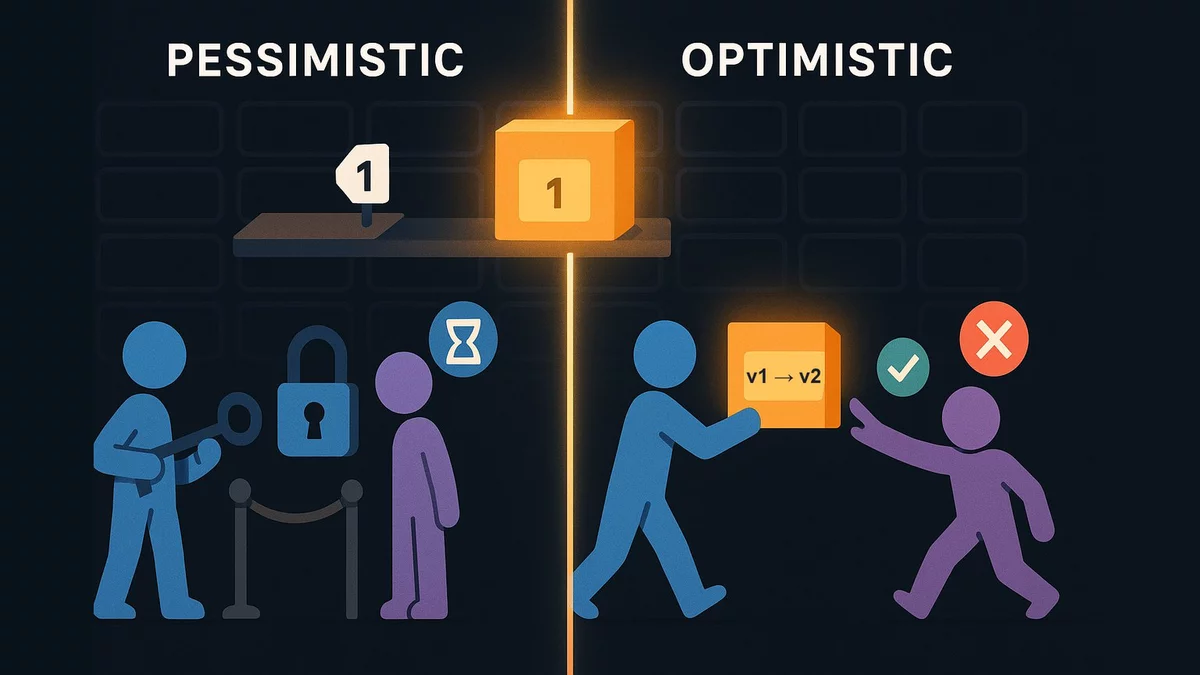
Two people buy the last unit of a product at the same time. Both see "in stock: 1", both click "Buy", and the database happily creates two orders. The code looks correct, the tests are green, and the bug only shows up under load. Let's see why this happens and which two philosophies fix it: pessimistic and optimistic.
The problem: the lost update
Take the simplest purchase logic, the one almost everyone writes:
- Read the stock:
SELECT stock FROM items WHERE id = 42. - In application code, check that
stock >= 1. - Write the new stock
stock - 1and create an order.
Time passes between step 1 and step 3: milliseconds for the network, for your code, for neighbouring queries. If a second buyer manages to read the same stock during those milliseconds, both will decide based on the same stale number. The second UPDATE simply overwrites the first. This is called a lost update.
READ COMMITTED isolation level: each query sees the data committed at the moment it started, and a plain SELECT blocks nobody. So wrapping the code above in BEGIN ... COMMIT does not save you from the lost update.There are two solutions, and they differ in their attitude to conflicts:
- Pessimist: "a conflict will definitely happen"
Before reading for modification, we lock the row. Everyone else who wants to change it queues up and waits. Like the key to a fitting room: while you hold it, the next person stands at the door.
- Optimist: "a conflict probably won't happen"
We lock nobody. But when writing, we check whether someone changed the row while we were thinking. If they did, the write fails, we re-read and decide again. Like a wiki: "the page changed while you were editing it".
There is also a third, simplest path: don't separate reading and writing at all, and make the check and the change a single command. We cover it below too.
Let us show everything on one example. Two transactions, T1 (Anna) and T2 (Boris), work with one items table: item 42 has a stock of 1. In every simulator below Anna is on the left, Boris on the right, and the shared table sits in the middle: it is the common resource they compete for. Stock, version and the lock holder are visible right in it. The simulator starts when you scroll to it.
Pessimistic locking in SQL
The key construct is SELECT ... FOR UPDATE. It reads the row and at the same time places a lock on it that is held until the end of the transaction (COMMIT or ROLLBACK). While you hold the lock, any other FOR UPDATE, UPDATE or DELETE of that row will wait. A plain SELECT without FOR UPDATE does not wait: readers don't block writers.
BEGIN;

SELECT stock FROM items WHERE id = 42 FOR UPDATE;
-- stock = 1. The row is locked until the end of the transaction,
-- a second identical query will wait here.

-- the application checks stock >= 1
UPDATE items SET stock = stock - 1 WHERE id = 42;
INSERT INTO orders (item_id, user_id) VALUES (42, 7);

COMMIT; -- the lock is released, the next one in the queue wakes up
An important detail: in READ COMMITTED, a FOR UPDATE that has waited returns the latest committed version of the row, not the one that existed when the wait began. That is exactly why Boris sees 0 in the simulator, not 1.
Here is how it looks for two people at once:
The same, but Boris does not wait and gets an error instead:
Variants worth knowing:
FOR UPDATE NOWAIT- if the row is busy, fail immediately withcould not obtain lock on row. For interfaces where it is better to say "busy, try later" than to hang.FOR UPDATE SKIP LOCKED- busy rows are silently skipped. The classic for job queues in a table: each worker takes the first free job and they don't jostle each other.FOR NO KEY UPDATE- a softer lock if you are not changing the primary key. It does not prevent other transactions from inserting rows that reference this one through a foreign key.FOR UPDATEis the strictest.SET LOCAL lock_timeout = '2s'- limit the wait so the query doesn't hang forever.
-- job queue: 10 workers in parallel, nobody takes the same job twice
BEGIN;
SELECT id, payload FROM jobs
WHERE state = 'new'
ORDER BY id
LIMIT 1
FOR UPDATE SKIP LOCKED;
-- ...run the job...
UPDATE jobs SET state = 'done' WHERE id = :id;
COMMIT;
The price of pessimism
- Waiting. While one transaction holds the row, the others stand still. If you do something slow inside the lock (an HTTP request to a payment provider, sending an email, an LLM call), the queue grows and database connections run out.
- Deadlock. If T1 locked row A and wants B, while T2 locked B and wants A, they wait for each other forever. PostgreSQL checks for such cycles after
deadlock_timeout(1 second by default) and kills one transaction with the errordeadlock detected. It is cured by a consistent lock order: for example, alwaysORDER BY id. - The lock lives exactly as long as the transaction. You can't "lock the row while the user fills in a form" - a transaction can't last minutes waiting for a human.
And this is what happens when two transactions lock rows in a different order:
Optimistic locking in SQL
Here a service column is added to the row, usually version (an integer). Every write increases it by 1, and does so only if the version is still the one we read:
ALTER TABLE items ADD COLUMN version integer NOT NULL DEFAULT 0;

SELECT stock, version FROM items WHERE id = 42;
-- stock = 1, version = 7. No locks, think as long as you like.

UPDATE items
SET stock = 0, version = 8
WHERE id = 42 AND version = 7;
-- UPDATE 1 -> success, we were first
-- UPDATE 0 -> someone was faster: re-read and decide again
The same scenario with a row version:
The database itself "catches" nothing here and throws no error. The conflict signal is the number of changed rows, and the application is obliged to check it. Forget to check and you get the same lost update.
Where optimism is especially good:
- Long edits by a human. A manager opened a product card, went to lunch, came back and pressed "Save". The version is passed in a hidden form field, and if a colleague saved first, instead of a silent overwrite we show "the data has changed, refresh the page".
- Rare conflicts. If a row is almost never touched concurrently, there is no point paying with waiting on every write.
- HTTP APIs. HTTP has the same principle: the server returns an
ETag, the client sends it inIf-Match, and on mismatch gets412 Precondition Failed.
Where it is bad: under high contention for a single row (a flash sale of one item, a shared counter) almost all attempts will fail and be retried. A pessimistic queue is fairer and cheaper in that case.
UPDATE itself in PostgreSQL still briefly locks the row until the end of its transaction. If two transactions run an optimistic UPDATE at the same time, the second waits for the first, then rechecks WHERE version = 7 against the fresh version of the row and gets UPDATE 0. The difference is that the lock is held for the milliseconds of the write, not for the whole time of "reading and thinking".The third way: an atomic UPDATE
Often you need neither pessimism nor optimism: the check can be moved straight into WHERE, and the calculation into SET. Then there is no gap between "read" and "write":
UPDATE items
SET stock = stock - 1
WHERE id = 42 AND stock >= 1;
-- UPDATE 1 -> the item is ours, create the order in the same transaction
-- UPDATE 0 -> out of stock

-- the same, returning the new value
UPDATE items SET stock = stock - 1
WHERE id = 42 AND stock >= 1
RETURNING stock;
This works for counters, balances, stock levels and flags of the form "move from state A to B only if it is currently A" (UPDATE orders SET state = 'paid' WHERE id = 5 AND state = 'pending'). If the decision requires complex logic in code (calling another service, computing a discount across ten tables), one command is not enough, and then you choose between the two approaches above.
What if we raise the isolation level?
In REPEATABLE READ and SERIALIZABLE, PostgreSQL itself notices that you are trying to change a row that someone else changed after your transaction started, and raises could not serialize access due to concurrent update. In essence this is optimistic locking built into the database: nobody waits in advance, the conflict is detected on write, and the whole transaction must be retried. The approach works, but it requires wrapping absolutely everything in a retry, so in practice the targeted tools above are chosen more often.
The same scenario with an atomic UPDATE. Nobody asked for a lock, yet it is there:
How to choose
| Situation | What to use | Why |
|---|---|---|
| Counter, stock, balance | Atomic UPDATE ... WHERE | Check and write in one command, the lock is minimal |
| Status change | Atomic UPDATE ... WHERE state = 'old' | The second actor gets 0 rows and understands it was too late |
| Complex logic, frequent conflicts | SELECT ... FOR UPDATE | A queue instead of endless retries |
| Job queue in a table | FOR UPDATE SKIP LOCKED | Workers take different rows and don't wait for each other |
| A user edits a form for minutes | Row version | A transaction can't stay open while a human thinks |
| Rare conflicts, many reads | Row version | Nobody pays with waiting for a conflict that isn't there |
What it looks like in Rails
ActiveRecord has both approaches out of the box.
Pessimistic: lock, lock!, with_lock
item = Item.find(42)
item.with_lock do                  # BEGIN + SELECT * FROM items WHERE id = 42 FOR UPDATE
  raise OutOfStock if item.stock < 1
  item.update!(stock: item.stock - 1)
  Order.create!(item: item, user: user)
end                                # COMMIT

# the same by hand
Item.transaction do
  item = Item.lock.find(42)        # SELECT ... FOR UPDATE
  ...
end

Item.lock("FOR UPDATE NOWAIT").find(42)
Job.where(state: "new").order(:id).lock("FOR UPDATE SKIP LOCKED").first
What is important to understand about these methods:
transactionon its own locks nothing. It is onlyBEGINandCOMMIT. The codeItem.transaction { item = Item.find(42); item.update!(stock: item.stock - 1) }is just as exposed to the lost update as it is without a transaction.with_lock=transaction+lock!. Andlock!reloads the record from the database withFOR UPDATE. So attribute values inside the block are fresh, but any changes you made to the object before the call and did not save would be lost. Rails raises an error in that situation so it doesn't happen silently.- Nesting. If
with_lockis called inside an already open transaction, there will be no new transaction. The lock will last until the outerCOMMIT- sometimes much longer than the code suggests. Item.lock.find(42)outside a transaction is useless. Rails runs the query in autocommit mode, and the lock is released right after it.
Optimistic: the lock_version column
It is enough to add a column with the magic name, and Rails starts checking the version on every save automatically:
# migration
add_column :items, :lock_version, :integer, null: false, default: 0

item = Item.find(42)                    # lock_version = 7
item.update!(stock: item.stock - 1)
# UPDATE items SET stock = 0, lock_version = 8
# WHERE id = 42 AND lock_version = 7
# 0 rows -> ActiveRecord::StaleObjectError

# retry on conflict
attempts = 0
begin
  item.reload
  raise OutOfStock if item.stock < 1
  item.update!(stock: item.stock - 1)
rescue ActiveRecord::StaleObjectError
  retry if (attempts += 1) < 3
  raise
end
For forms, the version is passed in a hidden field: f.hidden_field :lock_version. If someone saved the record earlier, the controller's update gets a StaleObjectError, and you can tell the user the data is out of date.
Atomically
updated = Item.where(id: 42).where("stock >= 1").update_all("stock = stock - 1")
raise OutOfStock if updated == 0

Item.update_counters(42, views_count: 1)  # UPDATE items SET views_count = COALESCE(views_count, 0) + 1
update_all returns the number of changed rows, but skips model validations and callbacks. For counters and status changes that is usually exactly what you need.
What it looks like in Go
In Go with database/sql (or pgx) everything is written as almost raw SQL, so the mechanics are fully visible.
// pessimistic
tx, err := db.BeginTx(ctx, nil)
if err != nil { return err }
defer tx.Rollback() // does nothing after Commit

var stock int
err = tx.QueryRowContext(ctx,
    `SELECT stock FROM items WHERE id = $1 FOR UPDATE`, id).Scan(&stock)
if err != nil { return err }
if stock < 1 { return ErrOutOfStock }

if _, err = tx.ExecContext(ctx, `UPDATE items SET stock = stock - 1 WHERE id = $1`, id); err != nil {
    return err
}
if _, err = tx.ExecContext(ctx, `INSERT INTO orders (item_id, user_id) VALUES ($1, $2)`, id, userID); err != nil {
    return err
}
return tx.Commit()
// optimistic: conflict = RowsAffected() == 0
for attempt := 0; attempt < 3; attempt++ {
    var stock, version int
    err := db.QueryRowContext(ctx,
        `SELECT stock, version FROM items WHERE id = $1`, id).Scan(&stock, &version)
    if err != nil { return err }
    if stock < 1 { return ErrOutOfStock }

    res, err := db.ExecContext(ctx,
        `UPDATE items SET stock = $1, version = version + 1 WHERE id = $2 AND version = $3`,
        stock-1, id, version)
    if err != nil { return err }
    if n, _ := res.RowsAffected(); n == 1 { return nil }
    // someone was faster: re-read and try again
}
return ErrConflict
In real code the UPDATE and the order INSERT must be in one transaction; here only the technique itself is shown, for brevity. In GORM, pessimistic locking is written as tx.Clauses(clause.Locking{Strength: "UPDATE"}).First(&item, id), and for optimistic locking there is the gorm.io/plugin/optimisticlock plugin with a field of type optimisticlock.Version.
tx, and then out of habit call db.QueryRowContext inside it. That query goes over a different connection from the pool, outside the transaction, and the lock on it has nothing to do with your tx.What it looks like in Node.js
With the pg driver the main rule is: the whole transaction must go through one connection taken from the pool.
// pessimistic
const client = await pool.connect();
try {
  await client.query('BEGIN');
  const { rows } = await client.query(
    'SELECT stock FROM items WHERE id = $1 FOR UPDATE', [id]);
  if (rows[0].stock < 1) throw new Error('out of stock');
  await client.query('UPDATE items SET stock = stock - 1 WHERE id = $1', [id]);
  await client.query('INSERT INTO orders (item_id, user_id) VALUES ($1, $2)', [id, userId]);
  await client.query('COMMIT');
} catch (e) {
  await client.query('ROLLBACK');
  throw e;
} finally {
  client.release();
}

// optimistic: conflict = rowCount === 0
const { rowCount } = await pool.query(
  'UPDATE items SET stock = $1, version = version + 1 WHERE id = $2 AND version = $3',
  [stock - 1, id, version]);
if (rowCount === 0) throw new ConflictError();
await pool.query('BEGIN'), then await pool.query('SELECT ... FOR UPDATE'). Each pool.query may take a different connection, so BEGIN opened in one, the SELECT ran in another in autocommit mode, and the lock was released instantly. The code looks like a transaction but isn't one.In ORMs the same thing goes by different names:
- Prisma has no
FOR UPDATEin its API, so people writetx.$queryRawinsideprisma.$transaction(async (tx) => { ... }). Optimistically - viaupdateMany({ where: { id, version }, data: { ..., version: { increment: 1 } } })and a check ofcount. - Sequelize:
Item.findByPk(id, { transaction: t, lock: t.LOCK.UPDATE })for pessimism, the model optionversion: truefor optimism (it throwsOptimisticLockError). - TypeORM:
.setLock('pessimistic_write')in the query builder and the@VersionColumn()decorator. - Knex:
.forUpdate(),.noWait(),.skipLocked()insideknex.transaction(async (trx) => ...).
Checklist
- See "read - check in the app - write" in the code? That is a race candidate. Ask yourself what happens if someone wedges in between the read and the write.
- Try an atomic
UPDATE ... WHEREfirst. It is the shortest and most reliable option. - Don't go to the network or do anything slow inside
FOR UPDATE. Locks are held for milliseconds, not seconds. - If you lock several rows - always in the same order.
- With the optimistic approach, always check the number of changed rows (or catch the ORM exception) and decide in advance what to do on conflict: retry or show the user.
- Make sure the transaction really is one: one connection in Node.js, one
txin Go, a nestedwith_lockin Rails lives until the outerCOMMIT.
SELECT ... FOR UPDATE. Lock in advance, the others wait. Suits frequent conflicts and short operations.version column and WHERE version = N. Nobody waits, the conflict shows up as 0 changed rows. Suits rare conflicts and long edits.UPDATE ... SET x = x - 1 WHERE x >= 1. No gap between read and write. Choose it first if the logic fits in one command.